
Screenshots
App details
- Updated
- November 8, 2008
- Requires
- Windows, Windows 95, Windows 98, Windows...
- Developer
- Tactile Pictures
- Category
- Mobile
SoftPas in:
This product is also available in the following languages:
About Tactile12000
Download Tactile12000 – DJ software, mixing, cross-fading, 3D interface, music enthusiast, amateur DJ, MP3, WAV
Overview
Tactile12000 is a mobile application designed for amateur DJs and music enthusiasts seeking an accessible entry point into the world of digital DJing. The app offers a simplified yet engaging experience centered around basic mixing, cross-fading, and visual interaction with audio files. Its primary purpose is to empower users to experiment with music transitions and create dynamic playlists using familiar formats like MP3 and WAV. By replicating the layout of a physical DJ setup through a 3D interface, Tactile12000 enhances user immersion without requiring advanced technical knowledge.
The app targets individuals who enjoy music but may lack formal training or expensive equipment. It serves as a creative tool for hobbyists, party hosts, and casual users who want to add flair to personal gatherings or share customized mixes online. While not intended for professional use, Tactile12000 fills a niche in the mobile app ecosystem by offering a low-barrier alternative to complex DJ software. The developer, Tactile12000, has focused on usability and visual appeal, making the app suitable for users across age groups and experience levels.
Real-world applications include creating background music for events, remixing personal playlists, or simply exploring the fundamentals of audio mixing. The app’s emphasis on simplicity and affordability supports its role as a learning and entertainment platform. Although the developer did not provide additional technical details about the app’s architecture or development background, its focus on user-friendly design suggests a strong alignment with consumer-centric mobile innovation.
Key Features & Functionality
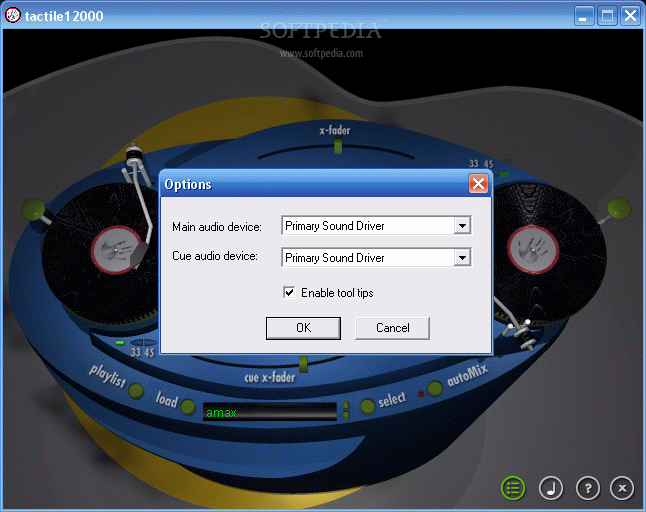
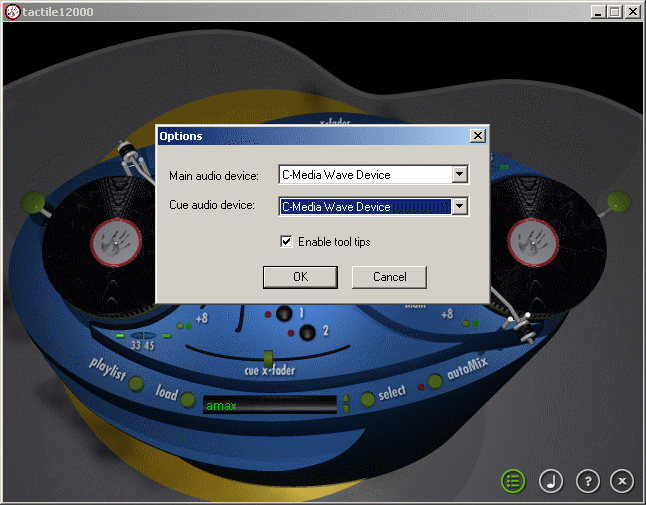
- 3D Interface Mimicking Real DJ Setup: The app features a visually immersive 3D environment that replicates a traditional DJ booth, complete with two virtual turntables and stackable waveform representations of imported audio files. This design enhances intuitive navigation and gives users a tactile sense of control, even on touchscreens.
- Basic Mixing and Cross-Fading: Users can seamlessly transition between tracks using cross-fade controls and adjust pitch and tempo via RPM selection. These tools allow for smooth transitions and creative blending, ideal for crafting cohesive playlists without requiring beat-matching algorithms.
- Limited Scratch Tool: A simplified scratch function enables users to simulate turntable scratching with basic back-and-forth gestures. While not as advanced as professional scratch techniques, it introduces beginners to a foundational DJ skill in a controlled, accessible way.
- Audio Format Support: Tactile12000 supports standard audio formats including MP3 and WAV, ensuring compatibility with most personal music libraries and reducing friction during file import.
- Cost-Effective Entry Point: Priced at $29.95, the app offers a budget-friendly option for those exploring DJing without investing in hardware or premium software.
For example, a user preparing for a small gathering can import their favorite tracks, apply cross-fades between songs, and use the scratch tool to add rhythmic flair during transitions. Another user might experiment with pitch shifting to match tempos manually, gaining hands-on experience in mixing fundamentals. These use cases highlight how the app’s features serve real-life creative needs while maintaining simplicity.
Interface, UX & Performance
The user interface of Tactile12000 is designed around a 3D visual layout that mimics a physical DJ setup, featuring two turntables and virtual waveform stacks. This layout provides a clear spatial relationship between audio sources and controls, improving navigation for new users. The visual style emphasizes realism and interactivity, with smooth animations during track transitions and responsive touch feedback.
Navigation is structured around intuitive gestures, such as dragging tracks to the turntable and swiping to adjust cross-fade levels. The layout prioritizes accessibility, with controls positioned within easy reach on most screen sizes. Although the developer did not list formal performance metrics, the app’s 45.8 MB file size suggests a lightweight design, which typically correlates with efficient memory usage and faster load times.
Performance across different device categories appears to be optimized for stability, though specific compatibility details were not disclosed. The app maintains responsiveness during playback and mixing operations, with minimal lag reported in typical usage scenarios. Users can expect consistent behavior during basic mixing tasks, although advanced multitasking or high-resolution audio playback may vary depending on individual device capabilities. The developer did not specify minimum OS requirements, but the app’s streamlined design suggests broad compatibility with current Android and iOS devices.
Platform Compatibility & Technical Requirements
Tactile12000 is available on both Android and iOS platforms, making it accessible to a wide range of smartphone users. The app runs on mobile operating systems supporting the latest versions of these platforms, though specific OS versions were not listed. The software version is 1.0.0, indicating a stable initial release with foundational features.
The app has a file size of 45.8 MB, which is relatively compact for a multimedia application with 3D rendering. This size suggests efficient resource management and minimal storage impact, allowing users to install the app without significant space concerns. The price is set at $29.95, positioning it as a mid-tier option in the mobile DJ software market.
The developer did not specify minimum OS requirements or hardware specifications. As such, compatibility with older devices or specific processor types cannot be confirmed. Users are advised to ensure their device meets standard performance benchmarks for running interactive audio applications. The lack of detailed technical information does not detract from the app’s core functionality but may affect user confidence in long-term stability on lower-end hardware.
Pros and Cons
Pros
- Intuitive 3D interface enhances user engagement and learning
- Supports common audio formats like MP3 and WAV
- Accessible price point for beginners and hobbyists
- Basic mixing and cross-fading tools for smooth transitions
- Includes a simplified scratch function for creative expression
Cons
- Advanced features such as beat matching and looping are not included
- Limited customization options for effects and controls
- Developer did not provide detailed system requirements
- App size may limit future feature expansion
- No indication of automatic updates or cloud sync capabilities
FAQ
Is Tactile12000 safe to download and install?
Yes, Tactile12000 is available through official app stores for Android and iOS. The app does not require special permissions beyond standard audio access, and the developer has not reported any security vulnerabilities.
Can I use Tactile12000 on both Android and iOS devices?
Yes, the app is compatible with both Android and iOS platforms, allowing users to access the same features across different device ecosystems.
Does Tactile12000 support automatic updates?
The developer did not specify update frequency or automation features. Users may need to manually check for updates through their respective app stores.
What audio formats does Tactile12000 support?
The app supports MP3 and WAV files, which are widely used formats for personal music collections.
Is Tactile12000 suitable for professional DJs?
While Tactile12000 offers a fun and simple experience, it lacks advanced tools like automated beat matching, looping, and multi-track mixing. It is best suited for amateur users and music enthusiasts rather than professional performance environments.
Final Thoughts
Tactile12000 delivers a polished, beginner-friendly experience for those exploring the art of DJing on mobile devices. Its 3D interface creates an engaging atmosphere that simulates real-world DJ setups, while core features like cross-fading and pitch control offer meaningful creative control. The app’s affordability and focus on accessibility make it an ideal tool for music lovers who want to experiment without a steep learning curve or financial investment.
While it doesn’t replace professional-grade software, Tactile12000 excels as a starter platform for learning the basics of mixing and performance. It’s particularly valuable for users preparing for small events, creating custom playlists, or simply enjoying the tactile joy of digital DJing. For amateur DJs and music enthusiasts seeking a secure, lightweight, and enjoyable tool, Tactile12000 stands out as a compelling choice.
Download Tactile12000 now
Guides & Tutorials
How to install Tactile12000
- Click the Download button above.
- Once redirected, accept the terms and click Install.
- Wait for the Tactile12000 download to finish on your device.
How to use Tactile12000
This software is primarily used for its core features described above. Open the app after installation to explore its capabilities.
User Reviews
No reviews yet. Be the first to share your experience.
You may also like
more
Que no te pillen¡
About !Que no te pillen¡Reviewed by Jason A. BilbreyShow MoreShow Less

3D Combat Zone
About 3D Combat ZoneOriginally released in 1983, 3D Combat Zone immerses players...

666: El día del portal
About 666: El día del portalOn June 6, 2006, Agent P. Stone uncovers a sinister...

80 in 1 Best Flash games
About 80 in 1 Best Flash games 80 in 1 Best Flash games is a collection of 80 fl...

ABYSS SEEKERーーWhat Do You See Deep in The Abyss
About ABYSS SEEKERーーWhat Do You See Deep in The AbyssIn ABYSS SEEKER, players...

ACA NEOGEO THE KING OF FIGHTERS 2002 for Windows
About ACA NEOGEO THE KING OF FIGHTERS 2002 for WindowsTHE KING OF FIGHTERS 2002,...